


When choosing a thermal label printer, DPI is one of the specifications that appears everywhere. You may see 203 DPI, 300 DPI, or occasionally even higher resolutions. But what does label printer DPI actually mean, and does a higher number always result in better labels?
For businesses, online sellers, warehouse teams, and home users, the answer depends largely on what you print. A standard shipping label does not necessarily need the same resolution as a small product label filled with fine text or a detailed QR code. Understanding DPI can help you choose a printer based on your actual workflow rather than simply selecting the highest specification.
What Does DPI Mean on a Label Printer?
DPI stands for dots per inch. It describes how many individual dots a printer can place across one inch of printed space.
For example:
- 203 DPI places 203 dots across an inch.
- 300 DPI places 300 dots across an inch.
- 600 DPI produces even finer detail but is generally associated with more specialized printing applications.
In thermal label printing, 203 DPI and 300 DPI are the most common resolutions. The higher density of dots at 300 DPI allows a printer to reproduce smaller details more precisely. That does not mean a 300 DPI printer is automatically the right choice for everyone. Resolution is only one part of the printing equation.
203 DPI vs. 300 DPI: What’s the Difference?
The easiest way to understand the difference is to consider the type of information being printed.
A 203 DPI label printer can produce clear text, addresses, barcodes, and other standard information. This makes it a practical choice for everyday shipping labels, inventory labels, and warehouse applications.
A 300 DPI label printer can reproduce finer details. It becomes more useful when labels contain small text, detailed logos, intricate graphics, compact QR codes, or other elements where additional resolution can improve clarity.
The difference may not be obvious on a large, simple 4 × 6-inch shipping label. It becomes more noticeable when the printable area is small or the design contains a lot of information. Think of it this way: if your label mostly contains a shipping address and a standard barcode, 203 DPI may already provide everything you need. If you’re trying to fit detailed product information into a small space, 300 DPI gives you more room to work with fine details.
Is 300 DPI Better Than 203 DPI?
Not necessarily. It is more accurate to say that 300 DPI is better suited to certain printing requirements. For standard shipping labels, 203 DPI is often sufficient. Many shipping workflows use relatively large labels with clearly defined barcodes and addresses, so extremely high resolution is not essential.
300 DPI becomes more useful when print quality is part of the label’s function or presentation. Consider 300 DPI if you regularly print:
- Small product labels
- Detailed logos
- Fine text
- Dense QR codes
- Intricate barcodes
- Ingredient or nutrition information
- Detailed retail or inventory labels
- Small-format labels where space is limited
For example, a bakery may need to fit ingredients and product information onto a relatively small sticker. A retailer may want a small label that combines a product name, barcode, SKU, and branding. In these situations, higher resolution can help preserve fine details.
When Is 203 DPI Enough?
For many users, 203 DPI is a practical starting point. If your main task is printing 4 × 6 shipping labels, you may not notice a meaningful improvement by moving to 300 DPI. Standard shipping labels generally contain relatively large text, addresses, and barcodes that can be printed clearly at 203 DPI.
The same applies to basic warehouse labels. If you are labeling boxes, shelves, storage containers, or inventory items, legibility and reliability may matter more than extremely fine detail.
A 203 DPI printer can also make sense for small businesses that prioritize straightforward everyday printing. Instead of paying for resolution they may not use, users can focus on other specifications such as connectivity, printing speed, label compatibility, and software support. The important point is to match DPI to the label rather than treating DPI as a standalone measure of printer quality.
When Should You Choose a 300 DPI Label Printer?
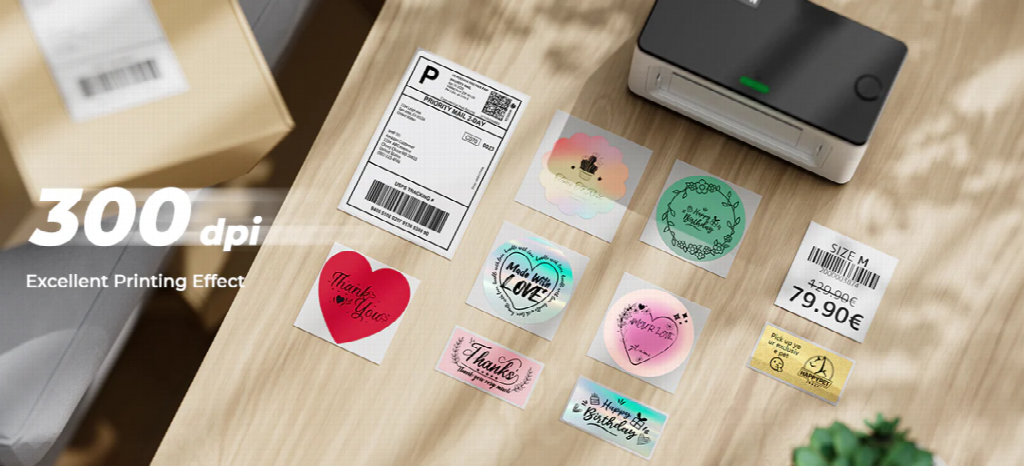
The case for 300 DPI becomes stronger when your labels are smaller or visually more complex. Imagine printing a product label that includes a logo, several lines of small text, a QR code, and a barcode. Compressing all of this information into a limited space can make print clarity more important.
A 300 DPI printer can create a denser grid of printable dots, allowing small elements to be reproduced with greater detail. MUNBYN, for example, positions its RW941BP 300 DPI thermal printer for applications involving small text, detailed graphics, QR codes, barcodes, and product labels. For sellers who are gradually expanding from basic shipping into branded packaging or product labeling, this extra resolution can also provide more flexibility.
Does DPI Affect Barcode Scanning?
It can, but DPI is not the only factor that determines whether a barcode scans correctly. Barcode readability also depends on the barcode’s size, design, contrast, label quality, print settings, and the scanner itself. A properly sized barcode printed by a 203 DPI printer can be perfectly readable.
Problems tend to become more apparent when barcodes are very small or contain dense information. In those cases, higher resolution can help preserve the edges and spacing of individual elements.
The same principle applies to QR codes. If a QR code is large enough and printed correctly, 203 DPI may work well. If you need a small QR code on a compact product label, 300 DPI provides additional detail that can be useful.
Other Label Printer Specifications Matter Too
DPI is important, but it should not be the only specification you compare.
1. Connectivity
Consider how you want to print. USB works well for desktop workflows, while Bluetooth can be more convenient when printing from phones or tablets. For example, the MUNBYN RW941BP supports both Bluetooth and USB connections, with Bluetooth compatibility for Windows, iOS, and Android and USB support for Windows and Mac OS.
2. Label Width
Make sure the printer supports the sizes you actually use. A printer may be excellent at 4 × 6 shipping labels but less convenient for a specialized narrow product label. The RW941BP supports direct thermal labels from approximately 40 to 110 mm wide, covering a range of common label formats.
3. Printing Speed
If you only print a few labels per day, speed may not be a major concern. For an online store processing dozens or hundreds of orders, however, printing speed can have a much greater impact on the workflow.
4. Printing Technology
Many shipping label printers use direct thermal printing. Instead of applying ink or toner, the printer uses heat to create an image on compatible thermal labels. This eliminates the need for traditional ink cartridges and makes thermal printers particularly convenient for shipping, ecommerce, inventory, and barcode applications.
5. Software and Platform Compatibility
A printer should fit into the platforms you already use. Online sellers may need compatibility with ecommerce and shipping systems, while small businesses may prioritize easy printing from computers and mobile devices. A technically impressive printer can still be frustrating if it does not integrate smoothly with your existing workflow.
How to Choose the Right Label Printer DPI
Instead of asking, “What is the highest DPI I can get?” ask a more useful question: “What kind of labels will I print most often?”
Use this simple guideline:
Choose 203 DPI if:
- You primarily print standard shipping labels.
- Your labels contain normal-sized text and barcodes.
- You print warehouse or inventory labels.
- You want a practical everyday printing solution.
Consider 300 DPI if:
- You regularly print small text.
- Your labels contain detailed logos or graphics.
- You use compact QR codes or dense barcodes.
- You print product, retail, or specialty labels.
- Fine print quality is important to your workflow.
For users looking for a higher-resolution option, a 300 DPI thermal printer such as the MUNBYN RW941BP combines 300 DPI printing with Bluetooth and USB connectivity. It supports label widths from 40 to 110 mm and is designed for applications ranging from shipping labels to detailed product and inventory labels.
Final Thoughts: DPI Should Match the Job
Label printer DPI is an important specification, but it should not be treated as a simple “higher is always better” measurement.
For everyday 4 × 6 shipping labels, 203 DPI can provide clear and practical results. If your workflow involves small text, detailed graphics, compact barcodes, or product labels, 300 DPI can offer useful additional detail.
The best choice ultimately comes down to the labels you print, the level of detail they contain, and how you use your printer every day.

